DDR4 is a type of synchronous dynamic random-access memory (RAM) with a high bandwidth interface. DDR5 is a computer memory specification. Compared with DDR4 memory, DDR5 has stronger performance and lower power consumption. According to the different performance and advantages of the two, in practical applications, how should we choose them?
Difference between DDR5 and DDR4
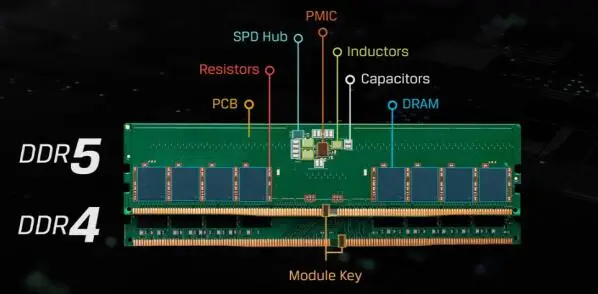
Features Comparison
1) Memory Frequency
DDR5 doubles the frequency of DDR4. When DDR4 first launched, the mainstream memory frequency was generally 2133MHz and 2400MHz, and later developed into 2666Mhz or above. At present, the flagship DDR4 memory frequency can reach 4266MHz or higher. The starting frequency of DDR5 memory released at the beginning is 4800MHz, basically reaching the limit of DDR4. What’s more, DDR5 memory also released higher frequencies of 5200MHz and 6400MHz at the same time, and it may be higher in the future.
2) Working Voltage
DDR5 is more energy-efficient than DDR4. The working voltage of DDR4 is 1.2V, while the DDR5 is 1.1V, and the power consumption is reduced by 8%.
3) Power Management Integrated Circuit (PMIC) Chips
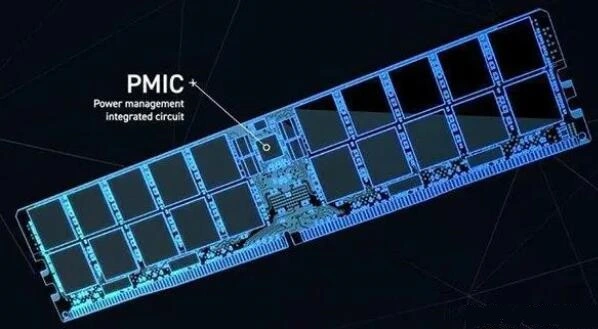
The PMIC of DDR4 memory is integrated on the motherboard. DDR5 also integrates the PMIC chip from the motherboard to the memory PCB board. It is the brain of the intelligent voltage regulation system, which promotes voltage slope and level while monitoring the current, and reduce the burden of motherboard power management.
4) Single Chip Density
Single DDR5 particle density is higher, which can reach 16GB, while the DDR4 is only 4GB, so the memory capacity of DDR5 will be larger. If using DDR5, it is normal for a single memory to reach 256G or even 512G, but the current memory requirements have not yet reached such a large level, and more may be used in high-end consumer grades.
5) Different Interfaces
DDR4 and DDR5 have a slight change in the position of the fool-proof port, which means that the two are not compatible with each other. If you want to support DDR5, then the motherboard must be equipped with a DDR5 slot, because it cannot be used in the DDR4 slot.
6) Bandwidth Speed
The transmission speed of memory bandwidth is different. Taking DDR4 3200 frequency as an example, the bandwidth is 25.6GBps, where the bandwidth of DDR5 4800 frequency is 38.4GBps.
7) On-die Error Correction Code (ECC)
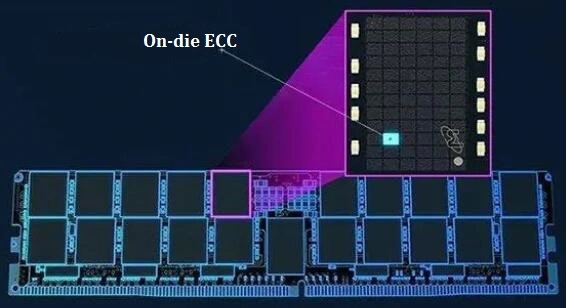
DDR5 has ECC error correction function, which can correct errors in communication during operation to improve the stability of the memory and reduce the probability of blue screen. It is a low-profile version of ECC.
8) One Stick Set Up Dual Channels
We know that only two DDR4 memory sticks can form dual channels, but a single DDR5 memory can achieve it. Through CPU-Z detection, if a DDR5 stick is inserted, the number of channels can be recognized as dual channels, but not It is a full sense of dual channels, which can be understood as pseudo dual channels. We can understand that the original DDR4 memory only has one 64-bit channel, and the dual channel is 2x 64bits, while the DDR5 memory is split into two 32Bits. so as to achieve the effect of 1 memory stick with dual channels, it is necessary to use 2 memory sticks.
9) Timing
The common timing of DDR4-2666 is basically CL17-CL19, while the common timing of DDR5-4800 is generally CL40. The higher the timing, the higher the delay. The initial DDR5 may not ideal for users, but after the frequency surge, there are slightly stronger than DDR4 memories. In fact, this is actually normal. When DDR3 is upgraded to DDR4, there is also a problem of higher timing. Compared with CL6-CL11 of DDR3, the timing of DDR4 is also higher, so does the delay.
10) XMP3.0 Technology
XMP3.0 is Intel's one-click overclocking technology for DDR5. Compared with XMP 2.0 technology, it has 5 configuration files, including 3 fixed configurations and 2 player-automatic configurations. What’s more, its name can be modified, and the voltage on the module is controllable. At present, some manufacturers have launched a visual overclocking software, which greatly reduces the overclocking threshold, and non-professionals can also enjoy the fun of overclocking.
Parameters Comparison
|
Specifications
|
DDR4
|
DDR5
|
DDR5 Advantages
|
|
Frequency
|
1600-3200
|
3200-6400
|
Improve performance and bandwidth
|
|
VDD/VDDQ/VPP
|
1.2/1.2/2.5
|
1.1/1.1/1.8
|
Reduce power
|
|
Internal VREF
|
DQ
|
DQ,CA,CS
|
Increase voltage margin and reduce BOM cost
|
|
Density
|
2Gb, 4Gb, 8Gb, 16Gb
|
8Gb, 16Gb, 24Gb, 32Gb, 64Gb
|
Support larger module capacity
|
|
Prefetch
|
8n
|
16n
|
Keep core clock low
|
|
DQ Receiver
Equalization
|
CTLE
|
DFE
|
Improve the openness of the DQ data accepted inside the DRAM
|
|
Duty Cycle
Adjustment (DCA)
|
No
|
DQS,DQ
|
Signals on DQ/DQS pins for improved transmission
|
|
Internal DQS
Latency Monitoring
|
No
|
DQS
Interval Oscillator
|
Improve stability
|
|
On die ECC
|
No
|
128b+8b SEC, Error Checking and Elimination
|
Enhanced on-chip RAS
|
|
CRC
|
Writ
|
Read/Writ
|
Enhance system RAS by protecting read data
|
|
BG
|
4BGx 4bank (x4/x8)
2BGx 4bank (x16)
|
8BGx 2bank (8Gb x4/x8)
4BGx 2bank (8Gb x16)
8BGx 4bank (16-64Gb x4/x8)
4BGx 4bank (16-64Gb x16)
|
Improve bandwidth, performance
|
|
Command/address interface
|
ODT, ODT, CKE, ACT, RAS, CAS, WE, A
|
CA<13:0>
|
Significantly reduces CA pin count
|
|
ODT
|
DQ, DQS, DM/DBI
|
DQ, DQS, DM, CA Bus
|
Improve signal integrity and reduce BOM cost
|
|
Burst Length
|
BL8 (and BL4)
|
BL16, BL32 (and BC8 OTF, BL32 OTF)
|
Only allows 64B cache line fetches for 1 DIMM
subchannel
|
|
MIP
|
No
|
Yes
|
Improve DIMM signal
|
|
Bus Inversion
|
Data bus inversion
|
Command/address inversion
|
Reduce VDDQ noise
|
|
CA Training,
CS Training
|
No
|
Yes
|
Improve timing margin on CA and CS Pins
|
|
Write Leveling
Training Mode
|
Yes
|
Improved
|
Compensate for mismatched DQ-DQS paths
|
|
Reading Training
|
Possibly with MPR
|
Dedicated MRs for training mode for serial (user defined), clock and LFSR generation
|
Make read timing margins more robust
|
|
Mode Register
|
7x17 bits
|
Up to 256x8 bit (LPDDR)
|
Provide room for expansion
|
|
Precharge Command
|
All banks and each bank
|
All banks, each bank and the same bank
|
PREsb enables precharge-specific bank in each BG
|
|
Refresh Command
|
All banks
|
All banks and the same bank
|
REFsb can refresh a specific bank in each BG
|
|
Loopback Mode
|
No
|
Yes
|
Enable DQ and DQS signal test
|
Performance Comparisons
In order to better let everyone understand the performance difference between DDR4 and DDR5 memory, i9-12900K uses (Z690 DDR4 version motherboard + 2 pieces of 16G DDR4 3600 frequency memory) and (Z690 DDR5 version motherboard + 2 pieces of 16G DDR5 5200 frequency memory) for testing , and measured using CPU-Z, ChineBench R20, 3DMark Time Spy and game frame check, respectively.
1) CPU-Z Benchmark
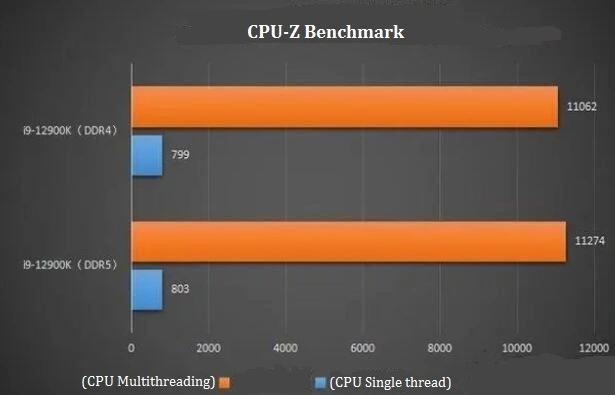
Using DDR5 compared to DDR4, in the CPU-Z benchmark test, the single-thread performance of the CPU is basically not improved, and the multi-thread performance is only slightly improved, with a score difference of only about 200 points.
2) Cinebench R20 Single Core Score
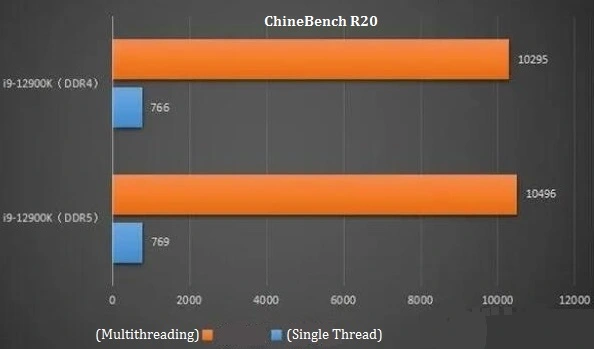
In the ChineBench R20 rendering test, DDR5 is basically the same in the CPU single-thread test compared with DDR4. DDR5 only has about 200 points more in the CPU multi-thread running score, and the performance improvement is not obvious.
3) 3DMark Time Spy (DX12)
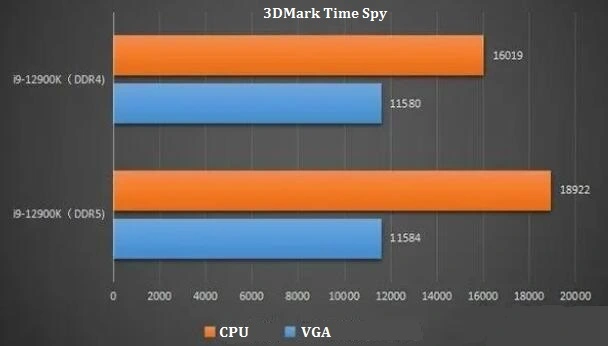
Through 3DMark Time Spy, we can see more intuitively that DDR5 basically does not improve the graphics card, but mainly improves the CPU performance. Combined with the above CPU-Z and ChineBench R20 tests, DDR5 has a certain effect on CPU multi-threading, but the improvement is limited and negligible.
4) Game Performance
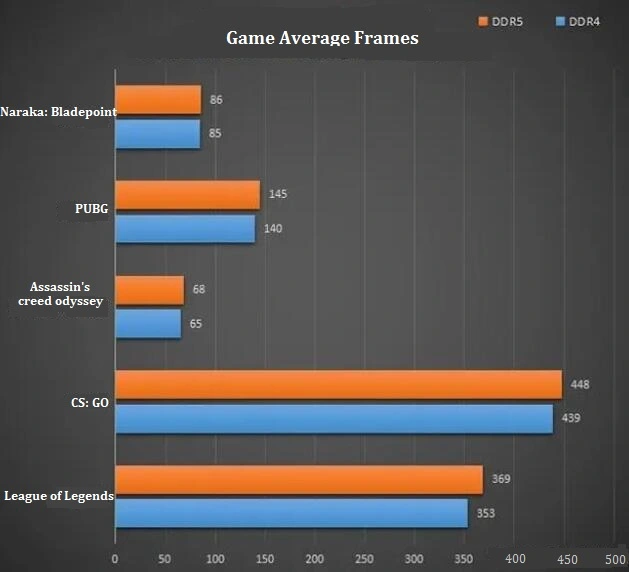
As for the gap between using DDR4 and DDR5 to play games, we used DDR4 and DDR5 memory to test the game respectively. Use the RTX3060Ti graphics card under 2K high-quality graphics to see how much the game frame rate has improved. Through the test, it is concluded that using DDR5 will slightly increase the number of game frames compared with DDR4, ranging from 1-5 frames to more than 10 frames.
Choose DDR4 or DDR5?
At present, the game performance of high-frequency DDR5 is gradually stronger than that of DDR4. But game users can still choose DDR4, which is more cost-effective. Of course, users can choose D4 or D5 according to their budget.
Main Parameters
1) Memory Capacity
16G is enough for most people, unless there is a need for professional software that occupies memory, choosing 32G and above memory. When buying, pay attention to buying 2 to form a dual channel, because the performance is greater than that of the single channel under the same conditions.
2) Memory Frequency
The frequency of the memory will be marked, 2666MHz, 3200MHz, 3600MHz, 4800MHz, 5600MHz, 6000MHz, etc., according to the needs. (Note: To buy high-frequency memory, you need to enter the bios to enable xmp, otherwise D4 runs at a default frequency of 2666MHz, and D5 runs at 4800MHz). In short, the overclocking party chooses according to the memory particles, and the non-overclocking party chooses according to the frequency.
3) Overclock PC RAM
Memory overclocking mainly depends on the particles of the memory, and they determine the timing and frequency. In fact, the particles also determine the upper limit of the memory, so the memory brand is not as important as the particles.
Overclock Memory Selections
* Intel
Intel® Core™ Processors Recommendation
10th Gen Intel: i3, i5 with b460 lock 2666, the memory can be bought at will, with b560 to support overclocking. i7 locks 2933 in the B series board, buy a overclocking RAM or a official 3000MHz one to open XMP. When choosing Z series, the board depends on the highest frequency and budget supported by your motherboard.
11th Gen Intel: The b560 unlocks the memory frequency and does not limit the memory frequency, but it will divide the frequency. And the frequency division depends on the motherboard to determine the optimal frequency. In addition, the general frequency is around 3600hz.
12th Gen Intel: It supports D4/D5, depending on which generation the motherboard supports. For example, Z690 DDR4 motherboard does not limit memory frequency, while the motherboard supports DDR5, memory should choose D5.
13th Gen Intel: It still supports D4/D5, and the D5 platform natively supports 5600MHz, and also supports super-higher frequencies. The overclocking D4 can choose B660 and Z690, and the overclocking D5 recommends B760 and Z790. The new generation motherboard has optimization for D5, but there is no improvement for D4.
* AMD
AMD Ryzen™ 3: Overclocking is based on CPU FLCK memory particles, the performance ratio is the largest FLCK: memory frequency is 1:2. And the general memory frequency is 1866, some can reach 1900, and very few can reach 1933, that is to say, the maximum memory frequency is around 3800Hz.
AMD Ryzen™ 5: Overclocking is the same as the Ryzen™ 3 based on CPU FLCK, the performance ratio is the largest FLCK: memory frequency is 1:2. And the general memory frequency is about 2000, and the best memory frequency is about 4000MHz.
AMD Ryzen™ 7: It only supports DDR5 platform, and the optimal memory frequency is 6000MHz.
DDR4 Selection
1) Memory Capacity
Table 1: Brands Recommendation
|
T0
|
Samsung B-die (special type)
|
|
Micron E-die
|
|
T1
|
Samsung B-die
|
|
Micron E-die(c9bjz)
|
|
Hynix DJT
|
|
Hynix CJR
|
|
T2
|
Hynix JJR
|
|
Micron E-die(d9vpp)
|
|
Hynix AFR
|
|
Samsung C-die
|
Note: The memory particle ladder, the ranking is based on the overclocking ability.
Table 2: Models Recommendation
|
Samsung B-die
(special type)
|
G.Skill royal halberd C14 3600, ADATA D60 4133, GALAX hall of fame 0C4600, etc.
|
|
Samsung B-die
|
Acer C14 3200, Acer C16 3600, Hall of Fame silver bar 3600, etc.
|
|
Micron E-die(c9bjz)
|
Crucial3200, 3000, 2666, etc
|
|
Hynix DJT
|
Acer c16 3600, KLEVV x C18 3600, etc
|
|
Hynix CJR
|
Kingstron Predator series
|
|
Hynix JJR
|
ADATA Golden Veyron 3000
|
|
Samsung C-die
|
Acer c183600, ADATA Xpg 3200, etc
|
|
Hynix AFR
|
G.Skill 3000 C16
|
The internal memory chips of G.Skill, Kingston, and ADATA are too messy, and the chips used for different frequency sequences may be different, and even the same timing frequency, different batches of memory chips are also different, so please ask clearly before buying.
2) Cost-effective DDR4 Recommendation
* Acer Predator 16G(8Gx2) DDR4-3200 C14 B-die
This is currently the cheapest Samsung B-die memory. It is very cost-effective for overclockers. For ordinary users, buying this to play games is also good. In terms of timing, Samsung B-die is better than C9 and CJR. In addition, 3600MHz C16 is also a Samsung b-die.
Acer Predator 16G(8Gx2) DDR4-3600 C16 D9WFL
The Micron D9WFL chip used by Acer can exceed 4000MHz. Although the timing is not as good as that of Samsung b-die, it is cheaper.
* CJR KLEVV 16G(8Gx2) DDR4-3200 Hynix CJR
Hynix CJR particles, the overclocking performance is acceptable, but not as good as Micron and Samsung.
3) Cost-effective D4 Extreme Overclocking Stick
* Acer Predator
The highest performance Samsung b-die, 3600hz C14 is also very good, on the one hand, its memory frequency can generally reach 4000MHz C15, on the other hand, the price is relatively low among the same type. In addition, G.Sill Royal Halberd C14 and GALAX Hall of Fame 4266 are also special Samsung B-dies.
4) DDR4 Memory Lighting Kit Recommendation
* Acer Predator 16G(8Gx2) DDR4-3600
* G.SKILL 16G(8Gx2) DDR4-3600
* USCORSAIR 16G(8Gx2) DDR4-3600
* ADATA D50 16G(8Gx2) DDR4-3600
5) Large-capacity DDR4 Memory Recommendation
* Kingstron FURY 32GB*2 3200Hz
* ADATA XPG-Z1 32GB*2 3200Hz
* ADATA XPG-D50 32GB*2 3200Hz
* G.SKILL Royal Halberd 32GB*4 3600Hz
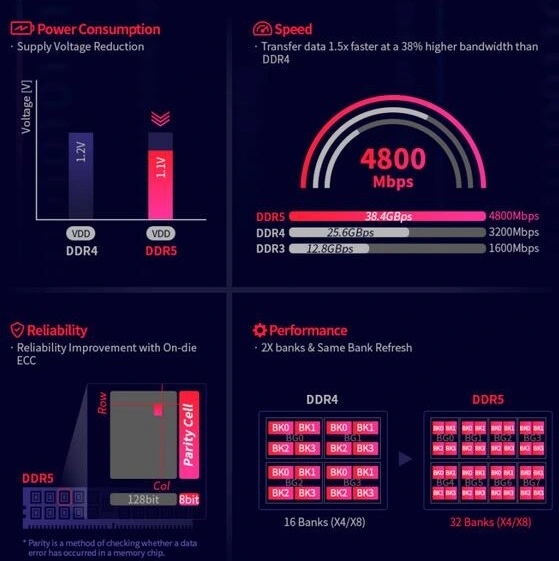
DDR5 vs DDR4 (source: SK Hynix)
DDR5 Selection
1) Memory Capacity
* Hynix>Samsung>Crucial
Hynix particles have a locked voltage version, and most brands are non-locked versions. If the memory voltage is locked, the overclocking capability is limited. Basically, the voltage of 7000MHz must be above 1.5V, so you should pay attention when buying memory and considering overclocking.
2) DDR5 Memory
At present, the price of DDR5 memory has decreased a lot, and considering performance can choose DDR5 memory. The best D5 chips are Hynix, followed by Samsung, and Micron chips currently have no overclocking capability.
3) Cost-effective Recommendation
* Acer Predator Vesta II RGB DDR5 C30 6000Mhz
It is Hynix A-DIE DDR5, and has strong overclocking performance, good appearance and cost performance, and its overall physical fitness is better than that of KINGBANK. The material of the case is very solid, and it also has RGB lighting effects.
4) High-performance DDR5 Recommendation
* Acer Predator DDR5-6800 C32 16Gx2
* Acer DDR5-7800 C36 16Gx2
They are all the latest version of special Hynix A-die, and the extreme overclocking performance of a well-matched motherboard is above 8400MHz. Even if XMP is directly turned on, the performance is good enough. And most important they are cost-effective. Now many 8000MHz memory sticks have been released, and they are similar to the above two models.
5) High-capacity D5 Recommendation
The main market of D5 is generally 32G strips, and the price of strips above 64G is still a bit expensive at present. The current recommendation is 6000MHz 32G×2.
* KINGBANK 64GB(32Gx2) DDR5-6000 Kit
* Kingstron FURY 64GB(32Gx2) DDR5-6000 Kit
* Acer Predator 64GB(32Gx2) DDR5-6000 Kit
Conclusion
Compared with DDR4, DDR5 has a significant increase in frequency and bandwidth, and further reduces power consumption. Having On-die ECC also improves memory stability. In addition, DDR5 has a 32-bank structure with 8 bank groups (four for each BG), twice that of DDR4. This effectively doubles the memory access availability. As a supplement, DDR5 also uses the Same Bank Refresh function. When the memory module is running or refreshing, it allows access to other memory banks. But the only disadvantage is high timing and high delay. After all, DDR5 is still an early product and requires a certain optimization process. Through the above tests, DDR5 memory has a certain improvement on CPU multi-threading, but basically no improvement on independent display. Because of the high frequency of DDR5, it has a certain improvement on the game frames, and perhaps the performance on the core display will be better.

 English