How long does a phone battery last? With the updates and iterations of smartphones, we have become inseparable from mobile devices in our daily lives. However, as the time spent using our phones increases, the battery gradually ages, leading to a shorter lifespan. So, how can we maintain battery health and extend its life span? Let's read the following full guide to understand it thoroughly.
Phone Battery Basic
View Your Phone Battery Types
A phone battery is a rechargeable energy storage part that powers a mobile phone. It usually consists of different types, which store and provide electrical energy to the phone's components, such as the screen, processor, and communication systems. So what are the mobile phone batteries that we often use in our daily lives.
Mobile phones use several types of batteries, each with its own characteristics. Here are the main types:
1. Lithium-Ion (Li-Ion) Batteries: These are the most common type used in mobile phones. They offer a good balance of energy density, lightweight, and longevity. Li-Ion batteries have a high energy density, which means they can store a lot of power relative to their size.
2. Lithium Polymer (Li-Po) Batteries: Similar to Li-Ion batteries, Li-Po batteries are also common in mobile phones. They use a gel-like electrolyte instead of a liquid one, which makes them lighter and allows for more flexible shapes. This flexibility helps manufacturers design thinner and more compact devices.
3. Nickel-Metal Hydride (NiMH) Batteries: These are less common in modern smartphones but were used in older models. They offer better capacity than Nickel-Cadmium batteries but are generally less efficient than Li-Ion and Li-Po batteries.
4. Nickel-Cadmium (NiCd) Batteries: These are the oldest type among those listed and are rarely used in modern phones. They have a lower energy density and suffer from memory effect, where the battery's capacity is reduced if it's repeatedly recharged before being fully discharged.
While Li-Ion and Li-Po batteries dominate the market due to their efficiency and performance, it's worth noting that ongoing advancements in battery technology could introduce new types in the future.
Phone Battery Capacity Check
Phone battery capacity is measured in milliampere hours (mAh), which indicates how much energy the battery can store. The higher the mAh, the more energy the battery can store.
The battery capacity of Android phones can vary widely depending on the model and manufacturer. However, most modern smartphones have battery capacities ranging from around 3,000 to 5,000 milliampere-hours (mAh).
For instance:
- Entry-level to mid-range phones often have capacities around 3,000 to 4,000 mAh.
- Flagship and high-end phones might have batteries in the range of 4,000 to 5,000 mAh or even slightly higher in some cases.
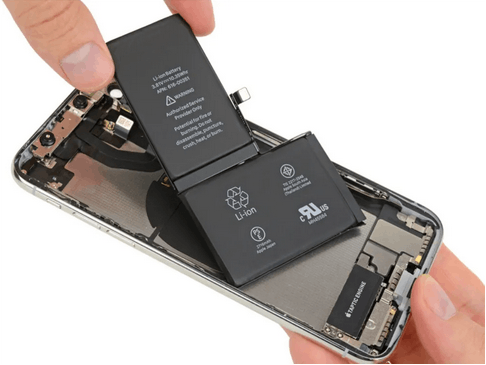
The battery capacity of iPhones also varies by model. Here’s a general idea for recent iPhone models:
- iPhone 14 Pro Max: Approximately 4,323 mAh
- iPhone 14 Pro: Approximately 3,200 mAh
- iPhone 14: Approximately 3,279 mAh
- iPhone 13 Pro Max: Approximately 4,352 mAh
- iPhone 13 Pro: Approximately 3,095 mAh
- iPhone 13: Approximately 3,240 mAh
Apple doesn’t usually advertise battery capacities in mAh directly, but these figures are based on third-party tests and teardown analyses. Battery life can also be influenced by software optimization and how you use your phone.
The capacity you need or prefer can depend on how you use your phone and what features are most important to you.
How to Check the Phone Battery Usage State?
To check your phone's battery usage and state, you can follow these steps depending on your operating system:
For iPhone (iOS)
Go to Settings > Battery, then tap Battery Health & Charging.
1. Open Settings: Tap the gear icon on your home screen.
2. Go to Battery: Scroll down and select "Battery."
3. View Battery Usage: Here, you’ll see a breakdown of your battery usage by app. You can tap on “Battery Health” to check the health of your battery, including its maximum capacity and peak performance capability.
iPhone displays information about your battery’s capacity, peak performance, and whether your battery needs to be serviced.
For Android
1. Open Settings: Tap the gear icon on your home screen or app drawer.
2. Go to Battery: The location may vary depending on your device manufacturer. Typically, you can find it under "Battery" or "Device Care" or "Power Management."
3. View Battery Usage: You’ll see a list of apps and how much battery they’ve used. Some devices also offer a “Battery Health” or “Battery Information” section where you can view details about your battery’s condition.
If you don’t see a battery health option on your Android phone, you might need a third-party app to get more detailed information, as some manufacturers don't include this feature in their default settings.
Observing Phone Battery Performance
In addition to directly checking the battery's health, users can assess its condition by observing its performance. For example, if the phone frequently experiences sudden drops in battery percentage, slower charging speeds, or significant heating, these could be signs of declining battery health. In such cases, it is advisable to replace the battery promptly to ensure the phone continues to function properly.
In short, checking these settings and battery performance regularly can help you understand how different apps impact your battery life and whether your battery might need replacement or servicing.
Extending Phone Battery Life
How to Extend My Phone Battery Life?
To maintain the battery life of your mobile phone, you can follow these effective strategies:
1. Reduce Screen Brightness or Timeout: Lowering the screen brightness or setting a shorter screen timeout can significantly reduce power consumption.
2. Turn Off Vibrate and Haptic Feedback: Vibrate and haptic feedback consume more battery power. Disabling these features can help extend battery life.
3. Disable Unused Apps and Features: Regularly check and disable any apps or features that you do not use frequently. These can drain the battery unnecessarily.
4. Use Battery Saver Mode: Activating battery saver mode can help optimize battery usage by reducing background activity and limiting performance.
5. Turn Off Unnecessary Connectivity: Features like Bluetooth, Wi-Fi, and GPS consume battery power. Turn them off when not in use.
6. Keep the Battery Charged: Avoid letting the battery drain completely before recharging. It's better to charge it when it reaches about 20% to avoid deep discharge cycles.
7. Use Original Chargers and Cables: Using non-original chargers and cables can damage the battery and reduce its lifespan.
8. Keep the Phone Cool: High temperatures can shorten battery life. Avoid exposing your phone to direct sunlight or leaving it in a hot car.
9. Update Software Regularly: Keeping your phone's software up to date can fix any battery-draining bugs and improve overall efficiency.
10. Optimize Apps: Check the battery usage of each app in your phone's settings. Uninstall or disable apps that consume a lot of battery.
By implementing these practices, you can effectively extend the battery life of your mobile phone and maintain its performance.
How to Charge Your Phone Battery the Right Way?
To maximize the lifespan and performance of your phone battery, consider the following charging tips:
1. Avoid Extreme Temperatures: Keep your phone away from direct sunlight and extreme cold to prevent damage to the battery. Optimal charging temperatures are between 32°F and 95°F (0°C and 35°C).
2. Charge in Moderate Temperatures: The ideal temperature for charging is around 72°F (22°C) or cooler. Avoid exposing your phone to temperatures above 90°F (32°C), as this can be harmful to the battery chemistry.
3. Charge at 20-80%: Try to keep your battery level between 20% and 80%. Charging to 100% regularly can stress the battery, and letting it drop to 0% can also be detrimental.
4. Avoid Overnight Charging: While it's convenient to charge your phone overnight, it's better to avoid this habit as it can lead to overcharging and reduce battery life.
5. Use Airplane Mode: To speed up charging, consider using Airplane Mode, which turns off mobile data and other connectivity features that consume battery power.
6. Regular Charging: Lithium-ion batteries perform best when kept above 50% charged. Avoid letting the battery drain completely, as this can shorten its lifespan.
7. Slow Charging: While fast charging is convenient, it can be harder on the battery. Use fast charging only when necessary and opt for slower charging methods when possible.
8. Remove Phone Cases: When charging, remove the phone case to prevent overheating, which can occur if the case traps heat around the device.
9. Adjust Settings: Adjust your phone's settings to reduce battery consumption. This includes using power-saving modes, reducing screen brightness, and disabling unnecessary features like Bluetooth and Wi-Fi when not in use.
10. Avoid Full Charge Cycles: Limiting your smartphone's maximum charge to around 80-90% can help extend battery life by reducing the stress on the battery from full charge cycles.
By following these tips, you can help ensure that your phone battery remains healthy and performs optimally over time.
Conclusion
In summary, understanding the health of your phone's battery is crucial for extending the phone's lifespan and enhancing the user experience. By applying the knowledge about battery lifespan discussed above, you can easily check the health of your phone's battery and take appropriate measures based on the actual situation.
You May Also Like
What is the Use of Sensors in Mobile Phones?

 English