High-Definition Multimedia Interface (HDMI) and DisplayPort (DP) are two common display interfaces at present, and they play an important role in connecting monitors and other devices. Both are digital interfaces used to transmit audio and video signals, providing high-definition picture and sound quality. There are some differences between these two interfaces, and they also have their own advantages.
HDMI
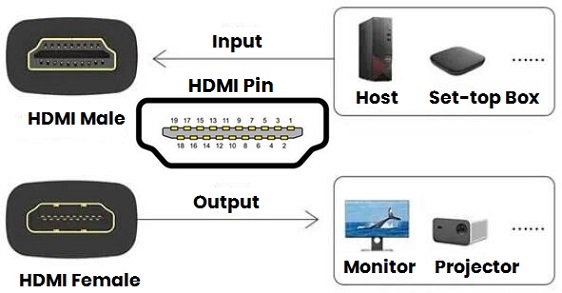
HDMI is a fully digital interface jointly launched by Panasonic, Sony, Toshiba and other TV manufacturers. It is mainly used to connect TVs, projectors, game consoles and other equipment. The characteristics of it are:
Wide applications: HDMI has become the standard interface for home entertainment equipment, such as TVs, projectors, set-top boxes, game consoles, etc. In addition, it also supports CEC (consumer electronics control) function, which can control multiple devices through one remote control.
High definition: HDMI can transmit uncompressed audio and video signals, ensuring clear picture and sound quality. The latest HDMI2.1 version can support 8K 60Hz or 4K 120Hz video output, HDR-10+ and other technologies.
Ease of use: HDMI only requires one cable to transmit video and audio signals at the same time, simplifying the complexity of the circuit. It also supports two-way communication and can realize functions such as automatic configuration and one-click playback.
The biggest disadvantage of the HDMI is that the transmission distance is limited, generally no more than 15 meters, otherwise there will be signal attenuation or interference. Moreover, it requires the support of copyright protection technology, otherwise it may not be able to play some copyright-protected content. In addition, the HDMI interface does not support bidirectional transmission and can only send signals from the source device to the target device.
Table 1: HDMI versions bandwidth, supported resolutions and corresponding refresh rates
|
HDMI Version
|
Bandwidth
|
Resolution & Refresh Rate
|
|
HDMI 1.0
|
4.95Gbps
|
1080p 60Hz
|
|
HDMI 1.1
|
4.95Gbps
|
1080p 60Hz, DVD-Audio
|
|
HDMI 1.2
|
4.95Gbps
|
1080p 60Hz, SACD
|
|
HDMI 1.3
|
10.2Gbps
|
1080p 120Hz, 1440p 60Hz, 4K 30Hz, Deep Color, Dolby, TrueHD/DTS-HD MA
|
|
HDMI 1.4
|
10.2Gbps
|
1080p 120Hz, 1440p 75Hz, 4K 30Hz, 3D, ARC, Ethernet
|
|
HDMI 2.0
|
18Gbps
|
1080p 240Hz, 1440p 144Hz, 4K 60Hz, HDR10
|
|
HDMI 2.1
|
48Gbps
|
1080p 240Hz, 1440p 144Hz, 4K 60Hz, 5K, 8K (7680x4320), 10K 30Hz, HDR10+, Dolby
|
DP
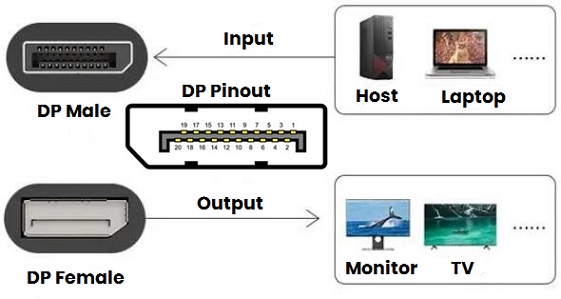
DP is a new interface jointly launched by AMD, Intel, NVIDIA and other computer manufacturers. It is mainly used to connect computers and monitors. The characteristics of the DP interface are:
High bandwidth: The DP interface has reached a bandwidth of 10.8Gbps from the first generation and supports 2560x1600 12bit output. The latest DP2.0 can reach a bandwidth of 77.37Gbps, supports 16K 60Hz or two 8K 120Hz video outputs, HDR-10 and other technologies.
Powerful: In addition to transmitting video and audio signals, DP also has an auxiliary channel that can be used to transmit low-bandwidth data, such as voice, video, game control, etc. Further more, it can be combined with the lightning interface to achieve more convenient expansion of types of equipment. It also supports AMD's multi-screen splicing technology and daisy chain technology, which can realize the connection and synchronization of multiple displays.
High security: DP uses AES encryption technology, providing a key length of up to 2048 bits to protect content from illegal copying.
The biggest disadvantage of DP is that it does not support the audio return function, and it cannot return the TV audio to the power amplifier through the DP for output. Moreover, the DP interface does not support the Ethernet function and cannot share the relative connection through DP. In addition, DP is not compatible with HDMI or DVI interfaces and requires a converter or adapter to connect.
Table 2: DP versions bandwidth, supported resolutions and corresponding refresh rates
|
DP Version
|
Bandwidth
|
Resolution & Refresh Rate
|
|
DP 1.0-1.1a
|
8.64Gbps
|
1080p 240Hz, 1440p 144Hz, 2560x1600 75Hz
|
|
DP 1.2-1.2a
|
17.28Gbps
|
1080p 240Hz, 1440p 165Hz, 4K 75Hz
|
|
DP 1.3-1.4a
|
32.4Gbps
|
1080p 240Hz, 1440p 240Hz, 4K 120Hz, 5K 60Hz, 8K 30Hz
|
HDMI vs DP
Basic Comparison
HDMI is essentially modified from the digital visual interface (DVI), so it still retains downward compatibility, unless HDCP content is involved or the Y'CBCR color space is used. In addition, since the DVI does not have a DDC pin, the control function will also be disabled. In short, in most cases, the conversion between the two will at least not affect the screen display, but now nobody use DVI, so the conversion problem doesn’t exist anymore.
After the emergence of HDMI, DP was launched with the purpose of replacing DVI. However, it is slightly different from HDMI in that it prefers to create a connection standard for displays. The most essential difference lies in the transmission method. HDMI is original data + time code, which is transmitted through 9 TMDS ports, and then recognized, corrected, decoded and played back by the receiving end. While DP transmission packages the original data and time code into data packets and then transmits them to the receiving end.
From HDMI 1.0 to the current 2.1, HDMI and DP are still essentially a "data cable", so its own data throughput may be the important point for us. For example, "what resolution/refresh rate monitor can be connected to this interface?", which can be calculated directly. The simplest method is to use (resolution) x (refresh rate) x (color depth) x 3 (RGB three primary colors), for example 4K (3840x2160) 144Hz 8bit, then the required bandwidth is 3840x2160x144x8x3≈28.6Gbps.
Why is it calculated in this way? This involves the transmission methods of HDMI and DP. In addition to transmitting data (including audio, video, control signals, etc.), HDMI also needs to correct the transmitted data, which is the clock data mentioned earlier. For example, before HDMI2.1, for every 10 bits of data, 2 bits of data are used for verification, and only 8 bits are actually transmitted to the screen data (that is, corresponding to various parameters of your monitor). If you want to completely fit your monitor, the display output requires x1.25, now DP is a good choice.
In addition, since HDMI 2.1 adopts the FRL (Fixed Rate Link) transmission mode - embedding the Clock in the Data signal, and then parsing out it through subsequent Clock Recovery processing. While the bandwidth overhead is much smaller than that of TMDS, and the original 2 bits for check have been changed. As the time code (CVT, CVT-RB, etc.) is updated, the bandwidth occupied by the check data will increase. Less, and the weighted number will be smaller. With the update of technology, DP takes into account the verification consumption, so this weighting is not needed.
With the iteration of versions, the specifications supported by HDMI and DP have been continuously improved, which can be said to be far ahead of the needs of most hardware. The following is a specific comparison of the two.
1) Bandwidth and transmission speed: DP uses LVDS technology, which has higher bandwidth and faster transmission speed, and can support higher resolution displays, such as 2560×1600 and 3840×2160. While HDMI uses TMDS technology, which is better at transmitting audio and video.
2) Color depth and audio quality: HDMI uses TMDS technology, which can provide better color depth and audio quality. And DP is also good in this regard, but not as good as the HDMI interface.
3) Multi-screen output: DP supports multi-screen output, which can connect multiple monitors to the same computer, which is very useful for users who need to use multiple screens at the same time. However, HDMI does not support multi-screen output.
4) Compatibility: Currently, there are many types of equipment that support HDMI interfaces, such as various TVs, stereos, game consoles, etc. The DP interface is mainly popular in the PC field and high-end monitors.
5) Security: DP and HDMI have their own content protection protocols. DP uses AES technology, and HDMI uses HDCP technology, both can prevent content from being illegally copied, but DP has a longer key length and is theoretically more secure.
6) Length: HDMI is better than DP because the maximum length of it can reach 15 meters, while the maximum length of the DP is generally about 3 meters. If you need to connect devices over long distances, the HDMI interface will be more suitable.
In short, HDMI and DP each have their own advantages and disadvantages. Which interface is better to use depends on the specific usage scenarios and personal needs. If you need higher resolution and faster transmission speed, or you need to use multiple screens at the same time, you can choose the DP interface. If you value audio quality and device compatibility more, or if you are connecting an HDMI device, you can choose HDMI.
HDMI or DP?
DP was originally a protocol set up for displays, and due to the circuit design, the current "extremely advanced" C port can be directly used for images transmission. This also explains why the C port of the notebook supports the DP protocol, and a separate HDMI interface is designed. In addition, whether it is HDR, VRR, or daisy chain technologies, DP's advantages are obvious. It can be said that it basically meets most of the needs of the computer monitor category - whether you are playing games or watching movies, and most devices equipped with DP1.4 interface can meet these needs.
For DP, although VESA has different tips for cables with different speeds, it does not impose restrictions on the UHBR standards for certifying DP2.1. That is, you can still label it as DP2.1 even if you do not meet certain speed standards, you can see from the table above that in most cases UHBR10 can transmit images with the same resolution and refresh rate as 13.5 or even 20, but the chroma sampling and color depth will be different, generally the human eye cannot tell the difference.
In summary, if you only play games at 2K high refresh rate (2K 240Hz standard), there is no difference between DP1.4 and HDMI 2.0/2.1. Include ultra-high scores, high refresh rates, and high color depth, if the monitors have mixed labels, DP may be a safer choice at the moment.

 English